
Completed sales and posted ledger entries can't be edited. To fix one, an admin posts a fee (debit) to the vendor who got the money by mistake and a credit to the vendor who should have gotten it, both for the same amount, on Money > Rent & fees.
Who this is for: Store admin
These steps use the New Experience. If your menu looks different, click Switch to New Experience at the top of the page.
Before you start
You need:
- The Administrator role (the Rent & fees page is for Administrators only).
- The wrong vendor, the correct vendor, the exact amount, and what the original sale or credit was for.
For a sale, use the amount the vendor was credited (after commission), not the sale price. You'll find it in the wrong vendor's account activity (People > Vendors > View > Account > Account activity): click the sale to see what the vendor earned.
Steps
- Go to Money > Rent & fees and open the Credits & fees tab.
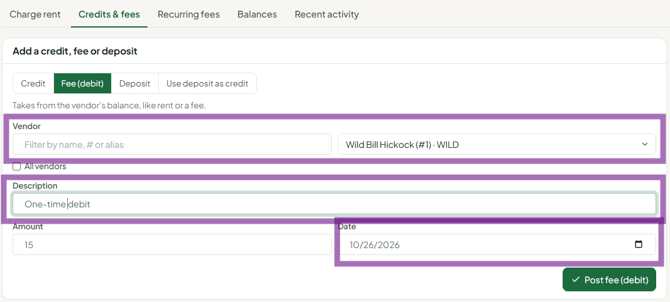
- Take the money back from the wrong vendor.
- Type: Fee (debit)
- Vendor: the vendor who was credited by mistake
- Description: something you can trace later, e.g. "Reversal of incorrect credit: sale #12345 on 9/24"
- Amount: the exact amount of the original credit Click Post.
- Credit the correct vendor.
- Type: Credit
- Vendor: the vendor who should have been credited
- Description: e.g. "Correction: sale #12345 on 9/24 belonged to this vendor"
- Amount: the same amount Click Post.
- Check the result. Open the Recent activity tab and confirm both new entries. On the Balances tab, confirm the wrong vendor's balance went down and the correct vendor's balance went up by the same amount. Neither entry triggers a payout. Both are picked up by the next settlement.
Why this method
Each entry records who made it, when, and why. Both vendors can see a clear explanation in their account activity, and the change holds up at settlement or in a dispute.
Common mistakes
- Using Credit to reverse. A credit adds money. To take money back, use Fee (debit).
- Using Deposit. Deposits don't affect the balance, so the wrong vendor would still be paid.
- Amounts that don't match. If the two entries differ, one vendor is overpaid or underpaid at settlement.
- Fixing it after settlement. Correct it before you run settlements. If the wrong vendor has already been paid, the fee makes their balance negative, and it carries forward.
Troubleshooting
- Credits posted in error through the API or an integration can be offset the same way. If you need an entry removed entirely before settlement, contact support.
- Support won't move the sale for me. For liability reasons, support doesn't alter sales. A store manager or admin makes these corrections.
