Why does my dual pricing store only show one price on the tag now?
Your dual pricing labels now print one price instead of two. What changed and why, why the card price looks higher than your card percentage, how to get clean tag prices like $29.99, and what to tell vendors and customers.
Short answer: this is intended, and it applies to every store using dual pricing. Dual pricing stores have moved to a single-price label format. Instead of printing both a cash price and a credit price, labels now display one price — the credit price — and Syncrostore applies the cash discount automatically at checkout when the customer pays with cash or check.
Nothing is missing from your tags, and nothing is misconfigured. One item, one tag, one displayed price.
What this looks like
| Price shown on tag: $20.79 | |
|---|---|
| Customer pays by card | $20.79 |
| Customer pays by cash or check | $20.00 |
The cashier does not need to calculate or manually apply the discount. Syncrostore handles it based on the payment method the customer chooses.


Why the change
Two-price tags asked a lot of everyone. Customers had to work out which number applied to them. Vendors had to write and maintain two figures on every handwritten tag. Cashiers were the last line of defense when a tag was wrong or ambiguous.
A single price removes all of that. The tag says what the item costs, the register takes care of the discount, and the discount still reaches every cash-paying customer exactly as before. What the customer pays has not changed — only what is printed on the tag.
Which price prints
Syncrostore picks the price automatically, everywhere labels are produced — standard labels, batch printing, custom label sizes and Label Designer. With dual pricing on, every item in your store prints the card price. There is nothing to set per item and nothing to remember at print time.
If dual pricing were turned off, labels would print the normal price instead and no discount would be applied at checkout — but that is a different store setting, not a labeling choice.
Do my existing two-price tags still work?
Yes. Tags already printed with both prices still scan normally. There is no need to pull merchandise off the floor or retag in a hurry.
The prices on them are still accurate, too. Your store is still dual pricing, so the cash and credit figures printed on an older tag are the same two numbers the register uses. The tag is simply busier than a new one, and it shows the customer a decision they no longer have to make on the shelf.
So there is no retagging deadline. Replace old tags as merchandise turns over and as vendors reprice, and let the floor migrate on its own.
Why one price is the compliant model
This is the question vendors ask most, and the simplest way to answer it is this: the card price is the actual posted price of the merchandise. Cash and check customers receive a discount from that posted price at checkout.
Showing one price is fully compliant with that model, and it makes the transaction far easier for the customer to understand. They see one advertised price, and if they pay with cash or check, they pay less than what was advertised.
It is also why this is not a surcharge. A surcharge would mean showing the customer $29.99 and then unexpectedly charging them $31.20 for using a card. That is not what happens here. If the tag says $29.99, then $29.99 is the card price — and cash or check simply receives the applicable cash discount.
One advertised price. Pay by card, you pay it. Pay cash, check, or gift card, you pay less. Nothing is added at the register.
“The card price looks like more than our card percentage”
A common report from vendors: the card price appears to be higher than 4% above the cash price when the store’s card percentage is 3.99%. Nothing has changed and the percentage is not wrong — it is sales tax showing up in the comparison.
The card price is not calculated by taking the cash price and adding your card percentage to it. The calculation accounts for the item price, sales tax and the card percentage together, then removes the tax portion to arrive at the correct item price. That way, when tax is applied at checkout, the final card total reflects the intended difference.
Because of that, comparing the two item prices side by side makes the gap look larger than the card percentage. The underlying card percentage has not changed.
Getting clean prices like $29.99 instead of $33.36
The most common complaint about one-price tags is that pricing an item at a nice round $29.99 makes the printed tag come out at something like $33.36 — a strange number to put on the sales floor, and one that can make a store look like it is charging more than it should.
The fix is to stop starting from the item price. With one-price tags you do not have to price at $29.99 and accept whatever the tag turns into. You decide what the customer sees, and let Syncrostore work out the price behind it.
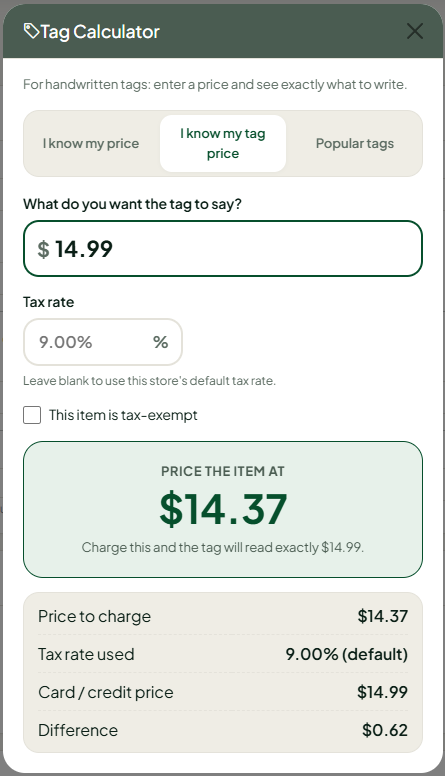
In the Tag Calculator, choose “I know my tag price” and enter the number you want printed. The calculator tells you exactly what to price the item at so that, after the dual-pricing calculation and sales tax, the tag comes out to that number.
For example: tell it you want the customer to see $12.00, and it tells you to price the item at $11.51. The tag prints at exactly $12.00.
So clean, normal-looking prices are still entirely possible — $10.99, $19.99, $20.00, $29.99. Sales tax is what makes the math look strange when you start from a round base price, and working backward from the tag price is exactly what the calculator is designed for.
For a vendor pricing a whole batch, the Popular Tags tab does the same thing for common price points at once, so they can price straight off a table instead of running items one at a time.
What to tell people who ask
Customers
“The price on the tag is what you pay by card. If you pay cash or check, you get a discount at the register automatically.” Most customers only notice the discount as a pleasant surprise at checkout.
Vendors
Vendors need slightly more: after the change, only one price should appear on their merchandise, and it should be the price the Tag Calculator gives them. The calculator already accounts for your tax rate, your card-pricing method and your card percentage, so the number it gives is already correct for your store. Vendors adding items in Syncrostore can also see what the tag will say at the moment they enter the item.
Cashiers
Nothing changes for them. They do not calculate the discount, apply it manually, or need to know which vendors participate.
Common questions
Did my customers’ prices go up?
No. The card-paying customer pays what they paid before, and the cash-paying customer still gets the same discount. Only the printed tag changed.
Can I go back to printing two prices?
No — single-price labels are the format for dual pricing stores now. The alternative is not two-price labels; it is turning dual pricing off entirely, which returns the store to traditional single pricing at the normal price with no cash discount at checkout.
How do vendors work out what to write on a handwritten tag?
The Tag Calculator. It has three tabs — enter what you want to earn, enter the tag price you want to land on, or use the Popular Tags table of common price points.
Has our card percentage gone up?
No. The recent updates did not increase the card percentage or change the formula behind it. If the gap between the cash and card price looks larger than your card percentage, see “The card price looks like more than our card percentage” above — that is sales tax in the comparison, not a rate change.
Are we charging the customer extra for using a card?
No. The tag price is the card price. Nothing is added at the register for paying by card — cash and check customers receive a discount from the posted price instead.
My vendors have questions I can’t answer. Where can I send them?
Syncrostore runs vendor webinars every Monday at 4:00 PM Central. Vendors are welcome to join and ask questions directly by clicking the Calendar icon in the software.
Where do I change my store’s pricing method?
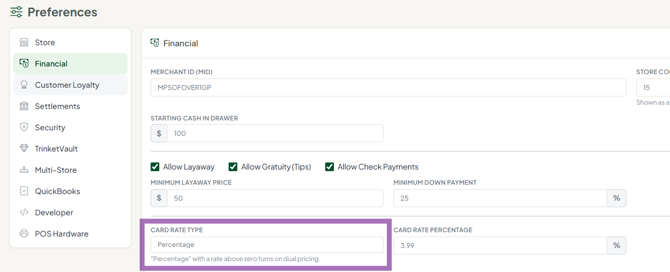
Admin → Preferences. That is also where you would find Vendor Choice Pricing, a newer option that lets each vendor decide individually whether their merchandise uses dual pricing. If some of your vendors do not want to participate in dual pricing, see Vendor Choice Pricing: How It Works and How to Turn It On.