
Every time cash moves in or out of the drawer outside a sale, record it here — otherwise it shows up as a variance at close.
Open Cash Drawer Management with a drawer open. Four buttons.
Cash AddedMoney going into the drawer: extra change from the safe, a float top-up.
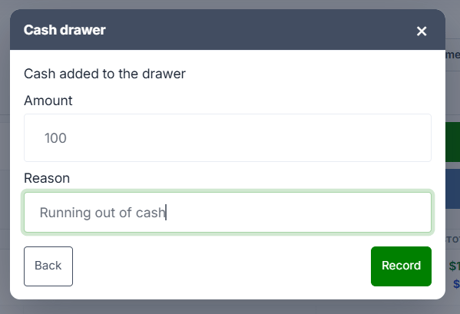
Enter the Amount and a Reason, then press Record. Both are required — "Enter a reason" if you skip it.
The expected total goes up by that amount.
Paid OutMoney leaving the drawer. Same form, plus a Type:
| Type | Use it for |
|---|---|
| Cash drop (to safe) | Moving money to the safe mid-shift |
| Petty cash / payout | Paying for something out of the drawer |
The expected total goes down either way — the distinction is for reporting, and they appear as separate lines on the drawer summary and the Cash Drawer Report.
Why the reason mattersThe reason is stored against the entry and is what makes a variance investigation possible weeks later. "Change to safe" is fine; leaving it vague isn't.
No SaleOpens the drawer without recording any money movement — for making change, or retrieving something dropped in.
It's logged for audit with the reason "No Sale", but it doesn't affect the expected total.
You'll see "Drawer opened (No Sale)". It needs QZ Tray to physically open the drawer; without it you'll see "QZ Tray isn't available to open the drawer."
The habit worth buildingPress No Sale with no drawer open and the drawer still opens, but nothing is logged. Open your drawer session at the start of the shift so the audit trail is complete.
Record it when it happens, not at close. Reconstructing three drops from memory at the end of a shift is how variances become permanent.
