
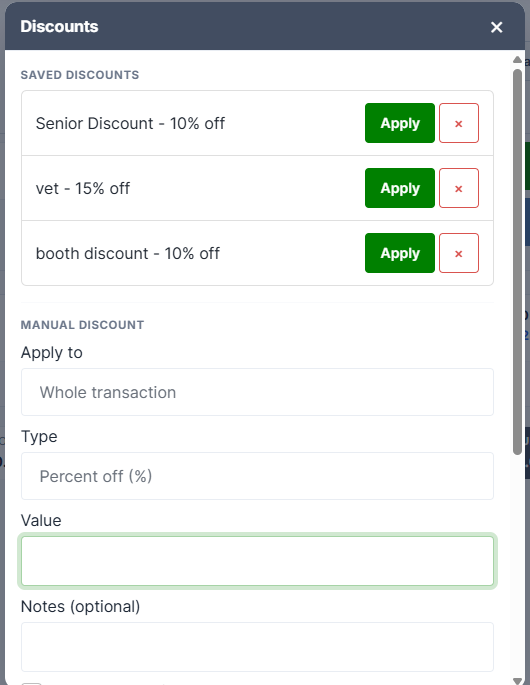
Open Discounts → Apply Discounts in the right rail. The window has three parts: your saved discounts, a manual discount, and — for managers / admins— a form to create new saved discounts.
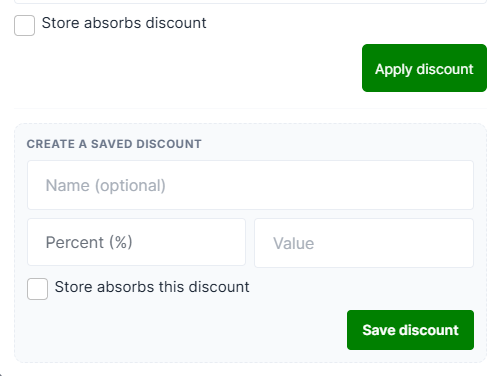
Note: Only Managers & Admins have the ability to create a saved discount.
Saved discounts
Your store's pre-set discounts are listed at the top with an Apply button each.
Saved discounts always apply to the whole sale, never to a single item — even if you have a row selected.
If your store has none set up, you'll see "No saved discounts. Use the manual discount below."
Manual discount
Apply to — choose Whole transaction, or This item: … to discount just the line you have selected. The single-item option only appears when a cart row is selected; click a row first if you need it.
Type:
| Type | What it does |
|---|---|
| Percent off (%) | Takes a percentage off. Must be between 1 and 99 |
| Amount off ($) | Takes a fixed dollar amount off |
| Set new price ($) | Sets the line to a specific price. Single items only |
Set new price is greyed out when you're discounting a whole sale — you can't set one price for a basket.
Value — the number, then Apply discount.
Notes (optional) — free text stored against the line, useful for recording why, Vendors will also see the note in their Ledger.
Store absorbs discount — tick this and the store takes the reduction; leave it unticked and it comes out of the vendor's proceeds.
What happens to the line
A discounted line gets a ▼ 10% off tag and its description gains " (Original Price: $24.00)", which also prints on the receipt.
Three things worth knowing:
- Discounts don't compound. Applying a second discount recalculates from the original price, not the already-discounted one.
- A whole-sale discount is spread across every eligible line in proportion to its value, so each line shows its own percentage.
- A dollar-amount discount shows an approximate percentage on the tag, because the tag is rounded to a whole number.
What can't be discounted
Layaway lines, gift cards being sold and rent payments are all refused with "Cannot apply discount to this type of item."
Common messages| Message | Meaning |
|---|---|
| Enter a valid percentage between 1 and 99 | Percentages must be a real reduction, not 0% or 100% |
| Discount cannot exceed the item price | You'd take the line below $0.00 |
| New price must be less than the original | Use Price on the row to raise a price |
| Select a cart line first | Choose Whole transaction, or click a row |
