
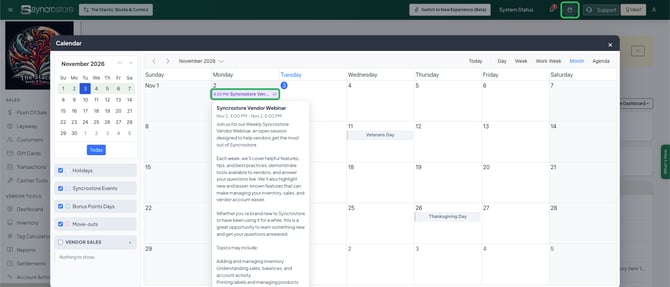
Click the calendar icon in the top bar, open the Syncrostore Vendor Webinar event on Monday, and click the meeting link in the event details at 4:00 PM Central.
Who this is for: Vendor
Join the webinar
- Log in to your store's Syncrostore site.
- Click the calendar icon in the top bar.
- Click the Syncrostore Vendor Webinar event on Monday.
- At 4:00 PM Central, click the meeting link in the event details.

Good to know
- The webinar is free and usually runs 60 minutes.
- Most weeks are open Q&A. Some weeks cover a set topic, such as adding inventory, reading your sales and balances, vendor reports, or new features.
- The webinar is a good place for how-to questions. For a software problem you need fixed now, open a ticket through the support chat instead of waiting for Monday.
Troubleshooting
- I don't see the event on my calendar. In the calendar's left panel, make sure Syncrostore Events is checked.
- The meeting link won't open. The webinar runs on Microsoft Teams. If you don't have the Teams app, choose the option to join in your browser.
