
On the register, open Layaway → Layaway Payment, pick the customer's layaway, enter the amount and press Add payment, then take payment as normal.
Who this is for: Cashiers using the register (Sales > Register). Staff can also start from Sales > Layaway: Take a payment opens the register.
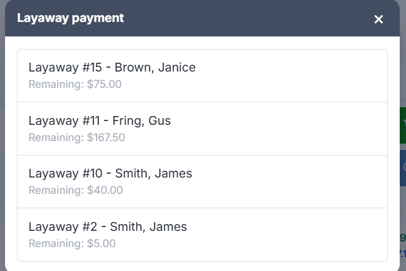
Every open layaway for your store is listed with its number, the customer's name and the remaining balance. Pick the one the customer is paying.
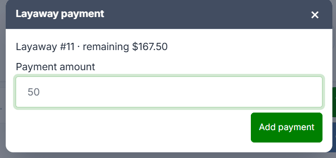
Take a layaway payment
- Attach the customer to the sale. A customer is required.
- Open Layaway → Layaway Payment. You don't need any items on the sale first.
- Every open layaway for your store is listed with its number, the customer's name and the remaining balance. Pick the one the customer is paying.
- The Payment amount is pre-filled with the full remaining balance. Type a smaller number for a partial payment.
- Press Add payment. The line reads "Layaway Payment for #142".
- Take payment as normal.
No tax on layaway payments
Layaway payments carry no tax. The tax was worked out when the layaway was created and is already inside the balance. Adding it again would charge it twice.
The balance only moves when the sale is paid
Adding the payment to the cart doesn't reduce the layaway. That happens when the sale is paid. If you abandon the sale, the layaway balance is untouched.
Troubleshooting
- "Attach a customer before taking a layaway payment.": attach the customer, then try again.
- A layaway isn't listed: the list shows unpaid layaways for this store only. It's either already paid off or belongs to another store in your group. Check it under Sales > Layaway (chip All).
