
Go to Settings > Store settings, open the Security tab, click Edit in the Security section, tick Require a manager PIN for large price cuts at the register, set the Price Cut Approval Threshold (%), and click Save.
Who this is for: Store admins.
These steps use the New Experience. If your menu looks different, click Switch to New Experience at the top of the page.
Anyone working your register can change what an item rings up for. Usually that is exactly what you want - a damaged item, a price-matched competitor, a customer who has been waiting too long. Manager approval for price cuts lets you say how far a cashier can go on their own, and records who changed what. You pick a percentage; anything larger asks for a manager PIN. Every price cut is recorded either way.
Turn it on
- Go to Settings > Store settings and open the Securitytab.
The feature is off until you switch it on, and the threshold starts at 10%. Nothing at your register changes until you save it.
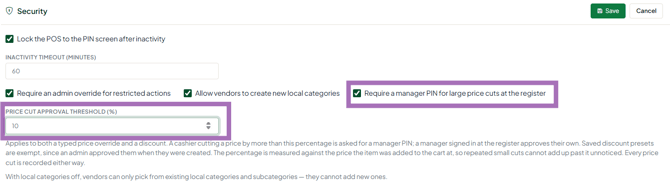
- In the Security section, click Edit.
- Tick Require a manager PIN for large price cuts at the register.
- A Price Cut Approval Threshold (%) box appears. Set the percentage you're happy for a cashier to give away without asking.
- Click Save.
The feature is off until you switch it on, and the threshold starts at 10%. Nothing at your register changes until you save.
Choosing a threshold
Set it just above the largest discount you're comfortable with a cashier giving on their own judgement. If your staff routinely knock a dollar or two off a $20 item, 10% covers that without ever prompting. If you want every reduction seen by a manager, set it to 1%.
What counts as a price cut
| What the cashier does | Covered? |
|---|---|
| Selects a line and uses Price to type a new price | Yes |
| Discounts > Percent off | Yes |
| Discounts > Amount off | Yes |
| Discounts > Set new price | Yes |
| A discount applied to the whole transaction | Yes - checked once, against the basket total |
| Applying a saved discount you created | No - see below |
| Raising a price | No - nothing is being given away |
How the percentage is measured
The percentage is measured against the price the item was added to the cart at, and that starting price doesn't move when the price is changed. So a cashier can't take 9% off, then another 9% off the new figure, staying under the threshold each time. The second reduction is measured from the original price, so it asks for approval.
If an item is already on a vendor sale when it's scanned, the sale price is the starting price. Selling it at the advertised sale price is not a price cut.
What the cashier sees
When a reduction goes over the threshold, a Manager approval box explains what's being asked for - for example: "That is 20% off $15.00. A manager PIN is needed for anything over 10%." The cashier can fetch a manager to enter a PIN, or press Cancel. Cancelling leaves the price exactly as it was.
Who can approve
- Approval uses the System PIN on a user's record. A PIN only works if that user is an Administrator or Manager at your store. A cashier's own PIN won't approve their own discount.
- To set or change a PIN, go to People > Users, click View on the user, fill in System PIN (four digits) and click Save.
- If a manager or administrator is signed in at the register themselves, they aren't asked for a PIN. The record still notes that a manager approved it.
Saved discounts don't prompt
A saved discount is one an Administrator or Manager already created, so applying it goes through without a prompt even if it's larger than your threshold. A 25% saved discount applies straight away; a cashier typing 25% by hand is asked for a PIN. This lets you set up discounts you're happy with - a staff discount, a veterans discount, a damaged-goods rate - while anything improvised gets a second pair of eyes.
Every price cut is recorded
Whether or not approval was needed, each reduction is written to your store's activity record with the item, the starting price, the new price, the percentage, who rang it, and who approved it. Cuts under your threshold are recorded too, marked as under threshold. If you need this pulled for a date range, contact support and we can retrieve it for you.
Troubleshooting
- Will this slow down my register? Only when someone goes past the threshold. Ordinary sales, saved discounts, and reductions under your percentage behave exactly as before.
- The PIN isn't working: check that the PIN belongs to an Administrator or Manager, that the user is attached to this store, and that their System PIN is filled in on People > Users. The message is the same whichever is wrong, so the register can't be used to work out which PINs exist.
- Different threshold per register or per cashier: not currently - it's one setting per store.
- Turn it off: on the Security tab of Settings > Store settings, click Edit, untick the box, and click Save. Price cuts are still recorded with the prompt off.
