
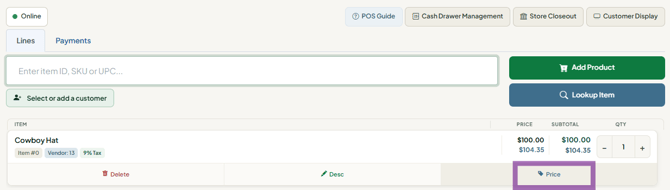
You can override a price on the register by pressing Price on the item's row; if the cut is larger than your store's approval threshold, a manager or admin must enter their PIN before it is accepted.
Who this is for: Cashier, Store admin
These steps use the New Experience. If your menu looks different, click Switch to New Experience at the top of the page.
How to override a price
- Go to Sales > Register and find the item in the cart.
- Press Price on that row. A box titled "Override price" opens with the current price filled in.
- Type the new price and press OK.
- If a Manager approval box appears (for example "That is 20% off $15.00. A manager PIN is needed for anything over 10%."), ask a manager or admin to enter their 4-digit System PIN in the Manager PIN box and press Approve, or press Cancel to leave the price unchanged.
Things to know
- Overriding a price removes any discount or vendor sale on that line. To take more off an already-discounted item, use Discounts instead.
- You can override to $0.00. Negative prices are rejected with "Enter a valid price".
- Raising a price never asks for a PIN.
- Saved discounts created by a manager do not trigger the PIN prompt.
For store admins: turning the PIN requirement on or off
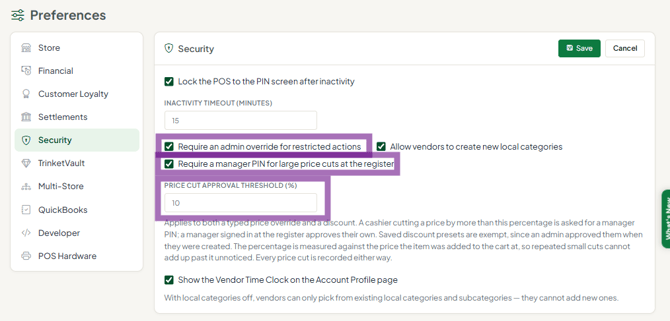
- Go to Settings > Store settings and open the Security tab. In the Security section, click Edit.
- Tick Require a manager PIN for large price cuts at the register and set the Price Cut Approval Threshold (%) (starts at 10%).
- Click Save.
- Set each manager's PIN at People > Users: press View on the user and fill in System PIN (four digits), then Save.
Troubleshooting
- "The PIN isn't working." The PIN must belong to a user who is an Administrator or Manager at this store, and their System PIN must be filled in on their user record. A cashier's own PIN cannot approve their own price cut.
- "Where can I see who overrode a price?" Go to Settings > Activity log and use the Pricing chip. Entries show the change, the transaction and who did it.
- The discount tag disappeared after I changed the price. That is expected - a price override replaces any discount on the line.
