
A credit adds to a vendor's balance. A fee (debit) subtracts from it. A deposit is tracked separately and does not affect settlements. Pick the type that matches what really happened, because a deposit will not reduce what the vendor owes.
Who this is for: Store admin
These steps use the New Experience. If your menu looks different, click Switch to New Experience at the top of the page.
The adjustment types
| Type | Effect on balance | Included in settlement? | Use it for |
|---|---|---|---|
| Credit | Increases (you owe the vendor more) | Yes | Corrections in the vendor's favor, refunds, promotions, prepaid rent |
| Fee (debit) | Decreases (the vendor owes you more) | Yes | Penalties, extra charges, reversing a credit posted in error |
| Deposit | None | No, tracked separately | Move-in or security deposits |
| Use deposit as credit | Increases | Yes | Applying money the vendor already paid as a deposit toward their balance |
Steps
- Go to Money > Rent & fees and open the Credits & fees tab.
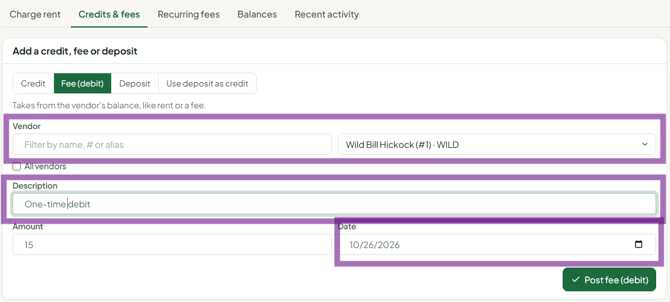
- Choose the type (Credit, Fee (debit), Deposit or Use deposit as credit).
- Pick the vendor.
- Enter a clear Description, the Amount and the Date. The description appears on the vendor's account activity.
- Click Post.
- To check what you posted, open the Recent activity tab on the same page, or open the vendor (People > Vendors > View) and go to Account > Account activity.
Common situations
- A vendor prepaid several months of rent. Post the payment as a Credit. Each month's rent run draws it down automatically.
- A payment was recorded as a deposit but was meant for rent. Deposits don't touch the balance. Apply it with Use deposit as credit, or post a credit. Yes, Use deposit as credit moves the money out of the vendor's held deposit and posts it as a credit on their balance, so the deposit held goes down by the same amount. It works for one vendor at a time and can't use more than the deposit currently held.
- When a vendor pays a deposit at the register, the cashier must mark it as a deposit, not a regular rent payment.
- The vendor paid outside Syncrostore (Zelle, cash to the owner). Post a Credit so the payment shows on their balance.
- Monthly add-on charges (camera, remote access). Set them up on the Recurring fees tab (Add fee), assign the vendors, and click Run each month when you post rent.
- A sale was credited to the wrong vendor. Post a fee to the wrong vendor and a credit to the right one (see "How do I move a sale or credit to the correct vendor?").
Troubleshooting
- I posted an entry by mistake. Posted entries can't be edited or deleted in the app. Post an equal, opposite entry (a fee to undo a credit), or contact support before you run settlements.
- I used Deposit to reverse a credit and the balance didn't change. Deposits don't affect the balance. Post a Fee (debit) instead.
- The vendor's deposit doesn't show in their balance. That's expected. Vendors see deposits in their account activity as "Security deposit (held)", not counted in their balance. The Deposits held card on Rent & fees shows the store total.
