
The register asks you to choose a variant when you scan or look up the parent product of an item that has variants, so it knows exactly which one you're selling.
Who this is for: Cashiers using the register (Sales > Register).
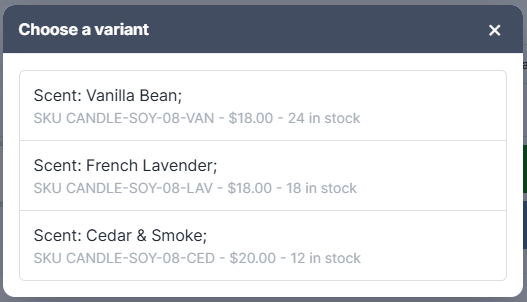
What you'll see
A window titled "Choose a variant" opens. Each row shows the variant's attributes, for example "Color: Navy; Size: L;", with its SKU, price and stock underneath.
- Check the stock number on the row.
- Click the variant the customer is buying. It's added to the sale.
If the item has no variants, no window appears and the item is added straight away.
How to skip the picker
The window only appears when you scan the parent product. Scan the variant itself and the register adds it directly. Any of these work:
- The variant's own SKU
- A V barcode, such as V4471
- The variant's global V… code
Variant labels printed from Inventory already carry a variant barcode, so scanning a label from the shelf never opens the picker. Only a generic parent barcode does.
Troubleshooting
- A variant shows 0 in stock but I can still pick it: the picker doesn't hide out-of-stock variants. Check the stock number before you pick.
- I clicked a variant in Lookup Item and the picker opened again: Lookup adds the parent product, which re-opens this picker so you can choose. It's an extra click, not a fault.
