
You can change the email address you use to sign in to Syncrostore yourself, from Settings. For your security, nothing changes until you confirm the new address from a link we email to it.
Before you start
- One sign-in, every store. If you use Syncrostore at more than one store, your sign-in email changes at all of them at once.
- Your password stays the same, and so does everything you can see: your vendors, sales, balances and checks.
- You'll need your current password, and access to the new email's inbox.
- The new email can't already be a Syncrostore sign-in. Two sign-ins can't share an address.
Sign-in email or contact email? Your sign-in email is what you type to sign in. Your contact email is where your store sends statements and notices. This article is about your sign-in email. To change only your contact email, edit Contact email in the My Account card on the same page and click Save changes.
Change your sign-in email
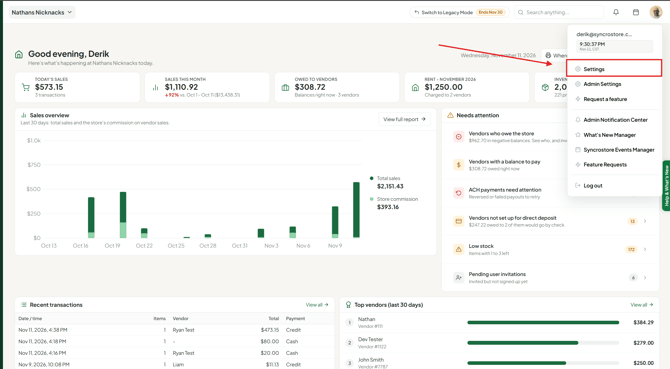
- Click your initials or photo in the top-right corner, then click Settings. You can also click Settings at the bottom of the left-hand menu.
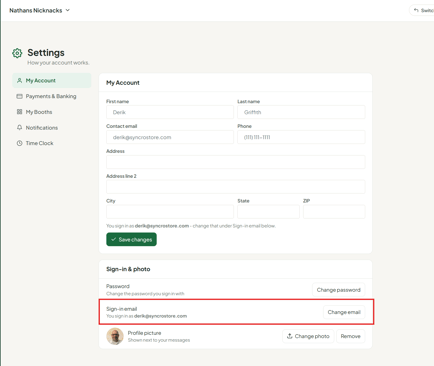
- On the My Account tab, scroll down to the Sign-in & photo card. Next to Sign-in email, click Change email.
- again.
- Enter your Current password.
- Click Send confirmation link.
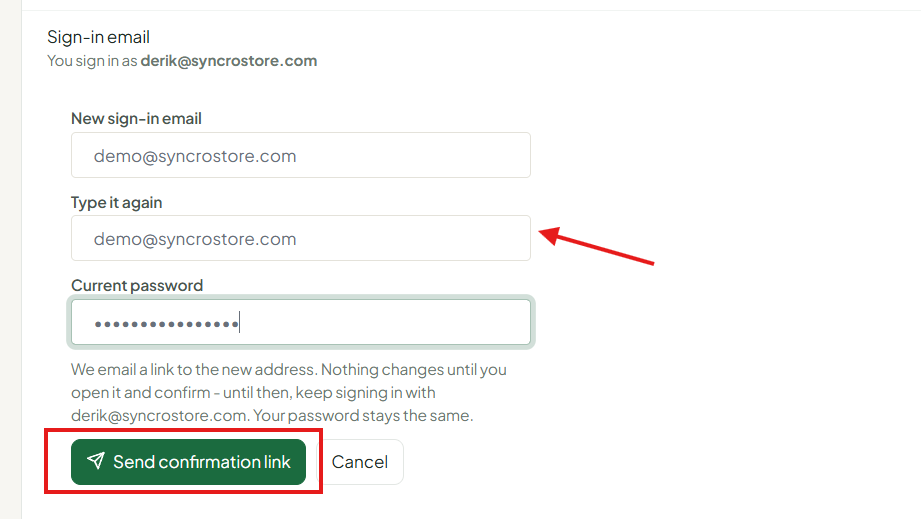
You'll see a message asking you to check your new email. The Sign-in email row now says it is waiting for you to confirm the new address, and how long the link has left. Nothing has changed yet – keep signing in with your current email until you confirm.
Confirm the new email
- Open the email "Confirm your new Syncrostore sign-in email" in your new inbox.
- Click Confirm my new sign-in email.
- The page that opens shows your current and new email. Click Confirm my new sign-in email to finish.
- You'll see "Done. Sign in with [new email] and your same password…". Click Go to sign in and sign in with your new email and your usual password.
What happens after you confirm
- Your old email stops working for sign-in at every Syncrostore store.
- If you're signed in somewhere else, such as the app or another computer, you'll be signed out within 30 minutes. Sign back in with your new email.
- If your stores sent statements to your old sign-in email, they now go to the new one.
When you ask for the change, we also email your current address to let you know. That's expected, and you don't need to do anything. If you ever get that email and didn't ask for a change, change your password right away and email support@syncrostore.com.
Changed your mind, or used the wrong email?
- Cancel it: in Settings → My Account → Sign-in & photo, click Cancel change. The link stops working.
- Send it to a different email: click Change email again and enter the right address. The new link replaces the old one.
- Or just ignore it: the link expires after 24 hours and nothing changes.
Didn't get the email?
- Check your spam or junk folder, and add noreply@mysyncrostore.com to your contacts.
- Check the address shown in the Sign-in email row for typos. If it's wrong, send a new link to the right address.
- You can send a new link every 2 minutes. Each new link replaces the last one, so always use the newest email.
Messages you may see
| Message | What to do |
|---|---|
| That isn't your current password. | Enter the password you sign in with today. Forgot it? Reset it from the sign-in page first. |
| Set a password first, then change your sign-in email. | Use Set password in the same card, then try again. |
| The two emails don't match. | Type the new email the same way in both boxes. |
| The new sign-in email is the same as the current one. | You already sign in with that email. Nothing to change. |
| That email can't be used for your sign-in. | That address is already in use in Syncrostore. If it really is yours, email support@syncrostore.com and we'll sort it out. |
| A link was sent a moment ago. | Check that inbox and its spam folder, or wait a couple of minutes and send a new link. |
| Changing your sign-in email isn't available right now. | Try again later. If it keeps happening, email support. |
| This link expired. | Links work for 24 hours. Send a new one from Settings. |
| A newer link was sent after this one. | Use the newest email. |
| This link was already used. | The change is done. Sign in with your new email. |
| Syncrostore support cancelled this change. | Keep signing in with your current email. Send a new link if you still want to change it. |
Don't see Sign-in email in Settings?
- If your top-right menu says Profile instead of Settings, you're using Legacy Mode. Click Switch to New Vendor Experience at the top of any vendor page, or add /Vendor/Next/Settings to the end of your store's web address, then follow the steps above.
- Still don't see it, or can't sign in at all? Email support@syncrostore.com with your current sign-in email, the new email and your store name.
